Print the Award Application
Print the Award Application
To print the award application you need reports created with the report generator. I will not explain here how reports are created. There is a very good help which you can activate while in the report generator. However I have prepared reports which are used in this example. You can use this reports to learn how I did it and you can adapt them to your needs
First we will print the QSO list. I have prepared the following reports:
-
DXCC Award QSO List.rpt a list as required by the ARLL for the award application
-
DXCC Application with Cover.rpt a list with cover as required by the ARLL for the award application
-
DXCC Award Application Cover.rpt a cover as required by the ARLL for the award application
Perform the following steps:
-
Select View ¦ Reports from the main menu
-
in Select the Data Source select 80M DXCC AWARD
-
in Report select the Report you want to print for example DXCC Application with Cover
-
press the View Report Button
-
if the Report is correct press the Print Report button
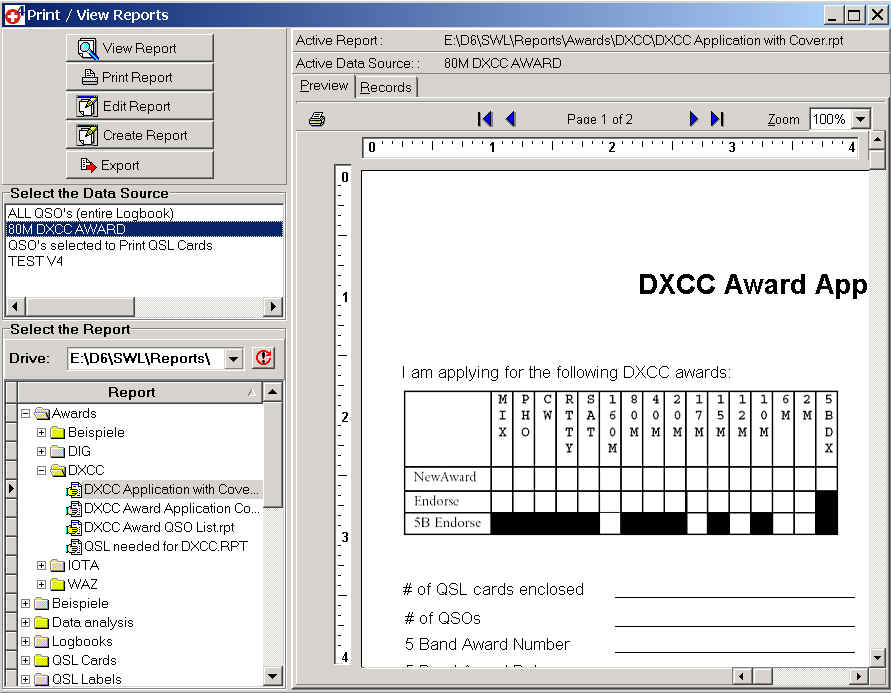
When you have checked everything and corrected possible mistakes you can print the final application. You can select a report which includes a Cover or print the list and the cover separately.
You may want to change the cover report and add the variable data into it. To do this open the report generator, load the cover report, edit it and save it with a new name.